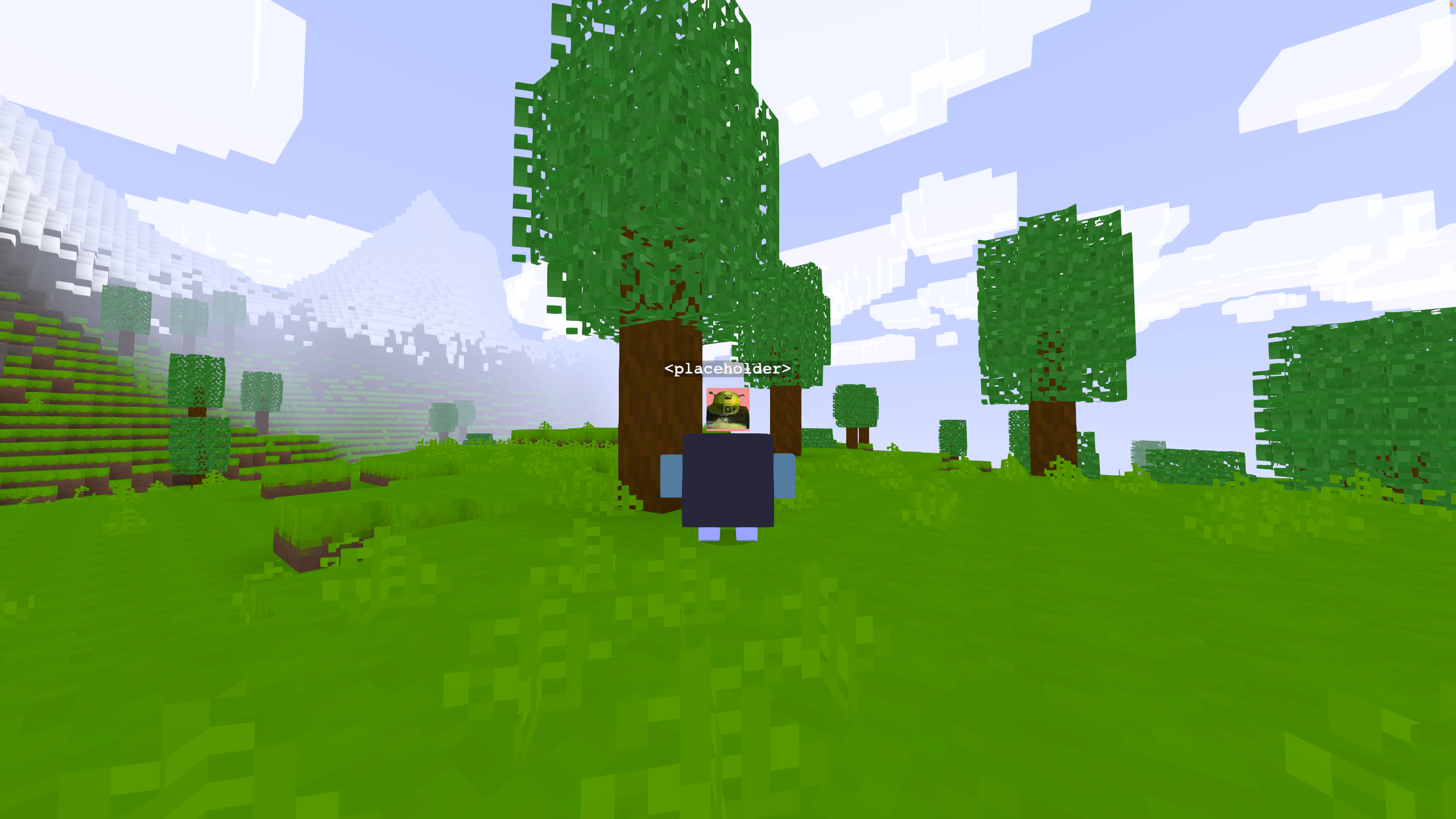
The default Voxelize character. This can be used in Peers.createPeer to apply characters onto
multiplayer peers. This can also be attached to a RigidControls instance to have a character
follow the controls.
When character.set is called, the character's head will be lerp to the new rotation first, then the
body will be lerp to the new rotation. This is to create a more natural looking of character rotation.
Example
const character = new VOXELIZE.Character();

// Set the nametag content.
character.username = "<placeholder>";

// Load a texture to paint on the face.
world.loader.addTexture(FunnyImageSrc, (texture) => {
  character.head.paint("front", texture);
})

// Attach the character to a rigid controls.
controls.attachCharacter(character);
Hierarchy
-
Group↳
Character
Constructors
constructor
• new Character(options?): Character
Create a new Voxelize character.
Parameters
| Name | Type | Description |
|---|---|---|
options | Partial<CharacterOptions> | Parameters to create a Voxelize character. |
Returns
Overrides
Group.constructor
Properties
body
• body: CanvasBox
The actual body mesh as a paint-able CanvasBox.
bodyGroup
• bodyGroup: Group<Object3DEventMap>
The sub-mesh holding the character's body.
extraData
• extraData: any = null
Somewhere to store whatever you want.
head
• head: CanvasBox
The actual head mesh as a paint-able CanvasBox.
headGroup
• headGroup: Group<Object3DEventMap>
The sub-mesh holding the character's head.
leftArm
• leftArm: CanvasBox
The actual left arm mesh as a paint-able CanvasBox.
leftArmGroup
• leftArmGroup: Group<Object3DEventMap>
The sub-mesh holding the character's left arm.
leftLeg
• leftLeg: CanvasBox
The actual left leg mesh as a paint-able CanvasBox.
leftLegGroup
• leftLegGroup: Group<Object3DEventMap>
The sub-mesh holding the character's left leg.
nametag
• nametag: NameTag
The nametag of the character that floats right above the head.
newBodyDirection
• newBodyDirection: Quaternion
The new body direction of the character. This is used to lerp the character's body rotation.
newDirection
• newDirection: Quaternion
The new head direction of the character. This is used to lerp the character's head rotation.
newPosition
• newPosition: Vector3
The new position of the character. This is used to lerp the character's position
onIdle
• onIdle: () => void
A listener called when a character stops moving.
Type declaration
▸ (): void
Returns
void
onMove
• onMove: () => void
A listener called when a character starts moving.
Type declaration
▸ (): void
Returns
void
options
• options: CharacterOptions
Parameters to create a Voxelize character.
rideOffset
• Readonly rideOffset: Vector3
The render-only translation produced by hinging the ride attitude at
the seat. It is baked into position while riding, so consumers that
derive anchors from position (e.g. mount attachment) should subtract
it to recover the raw tracked position.
rightArm
• rightArm: CanvasBox
The actual right arm mesh as a paint-able CanvasBox.
rightArmGroup
• rightArmGroup: Group<Object3DEventMap>
The sub-mesh holding the character's right arm.
rightLeg
• rightLeg: CanvasBox
The actual right leg mesh as a paint-able CanvasBox.
rightLegGroup
• rightLegGroup: Group<Object3DEventMap>
The sub-mesh holding the character's right leg.
shadowSelfBounds
• Readonly shadowSelfBounds: Vector4
The body's bounding sphere in world space (centre xyz, radius w). Every
part's entity shadow uniforms read it as uShadowSelfBounds, so no face
is shaded by the body it belongs to while anything beyond the body
still shades it. Kept current by update and
updateShadowUniforms; bindShadowSelfBounds shares it
with an accessory's uniforms.
speed
• speed: number = 0
The speed where the character has detected movements at. When speed is 0, the arms swing slowly in idle mode, and when speed is greater than 0, the arms swing faster depending on the passed-in options.
Accessors
armColor
• get armColor(): string | Color
Returns
string | Color
• set armColor(color): void
Parameters
| Name | Type |
|---|---|
color | string | Color |
Returns
void
bodyColor
• get bodyColor(): string | Color
Returns
string | Color
• set bodyColor(color): void
Parameters
| Name | Type |
|---|---|
color | string | Color |
Returns
void
eyeHeight
• get eyeHeight(): number
Get the height at which the eye of the character is situated at.
Returns
number
faceColor
• get faceColor(): string | Color
Returns
string | Color
• set faceColor(color): void
Parameters
| Name | Type |
|---|---|
color | string | Color |
Returns
void
headColor
• get headColor(): string | Color
Returns
string | Color
• set headColor(color): void
Parameters
| Name | Type |
|---|---|
color | string | Color |
Returns
void
isCrouching
• get isCrouching(): boolean
Returns
boolean
isSitting
• get isSitting(): boolean
Returns
boolean
isSwimming
• get isSwimming(): boolean
Returns
boolean
legColor
• get legColor(): string | Color
Returns
string | Color
• set legColor(color): void
Parameters
| Name | Type |
|---|---|
color | string | Color |
Returns
void
totalHeight
• get totalHeight(): number
Get the total height of the character, in other words, the sum of the heights of the head, body, and legs.
Returns
number
username
• get username(): string
Get the content of the nametag of the character.
Returns
string
• set username(username): void
Change the content of the user's nametag. If the nametag is empty, nothing will be rendered.
Parameters
| Name | Type |
|---|---|
username | string |
Returns
void
Methods
bindShadowSelfBounds
▸ bindShadowSelfBounds(uniforms): void
Have uniforms read this body's shadowSelfBounds: for an
accessory with a shadowed material of its own (armour, a hat), so it is
shaded like the body it is worn on.
Parameters
| Name | Type |
|---|---|
uniforms | EntityShadowUniforms |
Returns
void
dispose
▸ dispose(): void
Free the GPU resources this character owns: every canvas box layer under it (its six body parts and any hat, cape or extra hung on them) and every sprite label (the nametag, a speech bubble). Objects held in the hands are left alone: they are usually clones of cached block meshes that share geometry and materials with the rest of the world. Call once, after the character has left the scene for good.
Returns
void
fitShadowSelfBounds
▸ fitShadowSelfBounds(): void
Grow shadowSelfBounds to hold every mesh under the parts as posed now: for a body whose attachments reach past its anatomical boxes (splayed legs, a tail, a crest). Call once the body is built; the reach is measured in the body's own frame, so it turns and scales with it.
Returns
void
playArmSwingAnimation
▸ playArmSwingAnimation(): void
Play the "swing" animation.
Returns
void
refreshShadowSelfBounds
▸ refreshShadowSelfBounds(): void
Recompute shadowSelfBounds from the current pose: a sphere about the middle of the body that holds every part however the arms swing, carried, turned and scaled with the root (a swimmer lies along it, a fallen body rolls with it).
Returns
void
set
▸ set(position, direction): void
Set the character's position and direction that its body is situated at and the head is looking
at. This uses MathUtils.directionToQuaternion to slerp the head's rotation to the new direction.
The update needs to be called to actually lerp to the new position and rotation.
Parameters
| Name | Type | Description |
|---|---|---|
position | number[] | The new position of the character. |
direction | number[] | The new direction of the character. |
Returns
void
setArmHoldingObject
▸ setArmHoldingObject(object, side?): void
Set the character's arm holding object.
Parameters
| Name | Type | Default value | Description |
|---|---|---|---|
object | Object3D<Object3DEventMap> | undefined | The object to set as the arm holding object. |
side | "left" | "right" | "right" | - |
Returns
void
setCrouching
▸ setCrouching(crouching): void
Parameters
| Name | Type |
|---|---|
crouching | boolean |
Returns
void
setRideAttitude
▸ setRideAttitude(attitude, pivotDrop, seatDisplacement?): void
Drive the character's whole-body lean from the mount it is riding, so
the rider stays perpendicular to the mount's back instead of bolt
upright. The rotation hinges at the seat, pivotDrop below the
character's origin, keeping the rider planted while the torso pitches
and rolls. The head keeps tracking the look direction in world space.
Push this every frame while riding; the body eases back upright once pushes stop.
Parameters
| Name | Type | Description |
|---|---|---|
attitude | Quaternion | The world-space tilt of the mount (yaw-conjugated, i.e. without the mount's heading baked in). |
pivotDrop | number | Distance from the character's origin down to the seat. |
seatDisplacement? | Vector3 | World-space offset from the physics-derived seat to the mount's rendered seat (rotation of the saddle about the mount's center, render-only bobbing, etc.), so the rider stays glued to the rendered mesh rather than floating at the raw seat point. |
Returns
void
setSitting
▸ setSitting(sitting): void
Parameters
| Name | Type |
|---|---|
sitting | boolean |
Returns
void
setSwimming
▸ setSwimming(swimming): void
Parameters
| Name | Type |
|---|---|
swimming | boolean |
Returns
void
snapToTarget
▸ snapToTarget(): void
Returns
void
update
▸ update(): void
Update the character's animation and rotation. After set is called, update must be called to
actually lerp to the new position and rotation. Note that when a character is attached to a control,
update is called automatically within the control's update loop.
Returns
void
updateShadowUniforms
▸ updateShadowUniforms(lightingUniforms): void
Parameters
| Name | Type |
|---|---|
lightingUniforms | ShaderLightingUniforms |
Returns
void